how to backup whatsapp message
Some time we need to formatting mobile device to improve performance & user experience. In that situation more important thing is how to get data backup. It’s possible to save data like sms, phone book, gallery contents by pc suit software. But if we think about what’s app data backup then it’s too difficult, because most of the pc suite software does not support 3rd party apps. Here is the detail process how to back up your what’s app data
How to back up whatsapp data
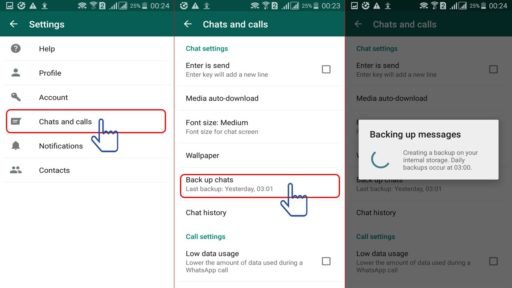
The data Backup file path as below
My file >whatsapp>database> msgstore-date-db.crypt8
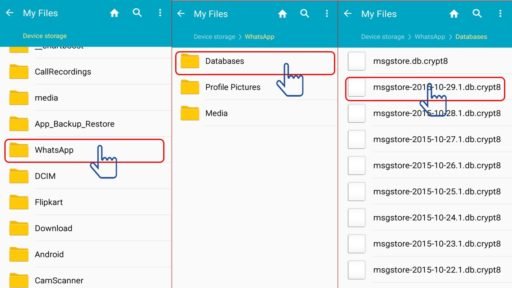
Now format your device
After formatting your device install whatsapp but don’t run,
Now past your old backup file which is already saved in your computer in the same directory. As below
Myfile>whatsapp>database> msgstore-date-db.crypt8
Now go back to main menu and run your whatsapp apps and verify your phone number. After that you will get a notification that a message backup was found. Just tap “Restore”,
Now it’s done